

EDRM Evergreen Project Print
  • RSS
  • Twitter
  • Add to favorites
  • LinkedIn
  • Facebook
  • Google Bookmarks

Review Guide

This entry is part of a series, EDRM Framework Guides»
Contents

Review

Aim: To gain an understanding of document content while organizing them into logical sub-sets in an efficient and cost effective manner.

Goal: Develop facts, reduce risk, reduce cost, leverage technology, facilitate collaboration and communication.
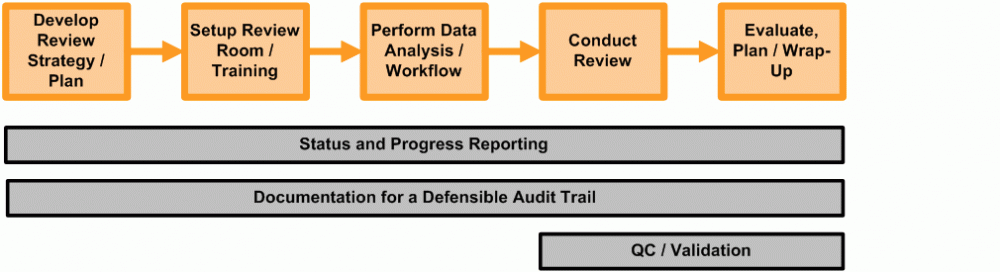
* Although represented as a linear workflow, moving from left to right, this process is often iterative. The feedback loops have been omitted from the diagram for graphic simplicity.

1. Introduction

Document review is a critical component to most litigation. At its most basic level the document review is used to identify responsive documents to produce and privileged documents to withhold. At later stages it is the time where the legal team can begin to gain a greater understanding of the factual issues in a case. It is also a time where legal strategies can emerge and begin to develop based on the type of information that is found in the collection of documents. There will inevitably be different strategies implemented for reviewing documents in preparation for production versus documents produced by opposing counsel. However the common thread is the need (a) to understand the scope of the review, (b) to put in place supervision and procedures for managing the reviewers and (c) to select the appropriate vendor, tools and platform for the review.

E-discovery, with its enormous volume of data, can seem daunting. The good news is that significant improvements in data storage, database and search technology, and review application functionality, are providing increasingly efficient options for handling the volume of data and streamlining the review process. In addition, emerging search technologies that use methods like concept-based searching, linguistic pattern recognition and other areas that move beyond traditional keyword searching are now being used for initial culling of data as well as to provide supplemental search capabilities for different stages of the document review. A general knowledge of tools and trends has become an important part of the job responsibilities for those charged with preparing for a document review.

In this Node we will discuss the many factors to be considered in preparing for a document review and managing it to completion.  We will do this in five main phases:  Scope, Plan, Establish, Execute and Wrap-Up.  To assist in finding relevant reference material faster we have also separated the content into Review Technique and the Review Process, which is more Project focused.  Content includes the initial planning for the review, selecting a vendor, determining whether a review is better performed in-house or externally, system functionality, search capabilities, training of reviewers, production tools and a wide range of related management issues. Our focus will be on electronic data, although some issues also are pertinent to the review of paper documents.

Throughout, we will introduce emerging technologies and trends. These provide the hope of helping us to enhance our ability to handle the growing volume of data and allowing us to further streamline the review process. If we accomplish those two objectives, we will be able to better serve our organizations and clients and will increase our chances of meeting the objectives of a sound overall litigation strategy

2. Review Technique

2.1. Scope

2.1.1. Objectives of the Review

Historically, lawyers were obligated to review every document presented to them by the client or opposing counsel in the litigation for relevance, responsiveness to discovery requests, and privilege. With the explosion of email and other electronic documents, reviewing each and every document is often unrealistic. While the scope of the review is usually dictated by the discovery request, a key strategy is to control the scope of the review through the use of technology or other aids. These techniques should be discussed and agreed upon during the initial planning meetings.

Techniques that can be useful to limit the scope include:

  • Strategic collection of data – it may be possible to do a more selective collection of key custodian data rather than a broad collection. There may be agreed upon file types or directory locations or key personnel.
  • Strategic filtering of collected data – this may take the form of applying date limitations and/or keyword filters against the data that has been collected.
  • Keeping ESI in its native format rather than a rendering to TIF or other image format.

In addition to limiting the scope, determine if the scope of the review is going to be “all ESI” or a hybrid of ESI and paper. Knowing this ahead of time will help to determine what additional techniques to use to limit the scope and plan the review.

Once the scope of what is to be reviewed is known, the selection of a knowledgeable review manager, to manage the review process, is an essential first step. The review manager must assure that those selected to conduct the review have a clear understanding of the case objectives. Additionally, it can be helpful to determine who else will comprise the review team and create an organization chart to ensure that all parties to the review know their role: corporate counsel, outside counsel, and, if needed, external reviewers.

The review manager should create clear documentation of the key issues and a distinction between issues of fact and issues of law. This documentation is generally captured in the form of Review Guidelines. These guidelines should not only identify the scope of the review and what the team will be looking for, but also include exemplar documents of the kind of evidence the litigation team will need to effectively prosecute or defend the matter. An understanding of who the key players are and what roles each plays in the case will enhance the review team’s ability to hone in on the critical pieces of evidence to the litigation. Many times it helps to create an organization chart of the key players to further identify their relationships to one another and to the matter.

The review objectives may evolve as a case progress through the different phases of litigation. As it does, it is the responsibility of the review manager to update the review guidelines so that they remain current with the ongoing review. The following represents a few types of review that may be undertaken:

  • Determine the relevancy of the information or documents collected or produced
  • Use database fields, marks or tags within the application to categorize documents and facilitate improved search and retrieval of the documents collected or produced
  • Determine whether or not any privilege applies to the documents subject to production
  • Determine to which request(s) for production the documents are responsive
  • Identify documents that should be marked as “confidential” or have portions redacted
  • Relate key documents to alleged facts or legal issues previously outlined in the case
  • Relate key documents to key players who may testify about the documents
  • Identify other subjective information
  • Reviewing the foreign language documents

In a few circumstances, a single review may encompass all these objectives. In reality, they are generally done in phases and by a variety of different reviewers, each with a clearly identified role in the review.

A key step in planning for the electronic review is to make sure that those selected to manage and conduct the review have a clear understanding of what the case is about. All those involved in selecting the review platform and spearheading the review process should review copies or summaries of the petition/complaint and answer(s).

All members of the review team should be provided copies or summaries of any discovery requests and answers thereto. Any special discovery orders or stipulations should also be summarized and available to the review team to make sure that the review is conducted in compliance with those orders or agreements. As a matter of course, the review team should receive training on the matter itself, the workflow designed, and to the review application selected.

2.1.2. Meet and Confer

Early in the litigation the case team must make a determination about the scope of the review: what is to be reviewed, how it is to be reviewed, and what is the intended outcome. To a great extent, the discovery order will direct what data is to be collected and reviewed. A meet-and-confer conference between the parties should be conducted early on in the planning stages to make these decisions. The Federal Rules of Civil Procedure 26(f) states that these initial meeting are to include discussions and decisions on matters pertaining to electronically stored information (ESI). Topics to be determined include preservation of ESI, the form of production for the ESI, and approaches for asserting privilege and work-product protection claims. Each of these decisions impact the planning of the document review and decisions, like the form of production, can drive the decision to use a particular strategy or review platform.

2.1.3. Analysis of Data

2.1.4. Review Strategy

2.1.4.1. Review Environment, Communication and Technical Support

Depending on the needs of the case, a centralized location for the review may be set-up. It is equally acceptable for the review team to work remotely or within their individual offices although this may require a greater need for internal communication protocols. In any case, the review environment should be well lit, be free of distracting outside noise, and be positioned so that no unrelated foot traffic runs through the area.

The review environment also should include appropriate computer technology that allows the review to be completed with a minimum of technical distractions, such as slow connections or software glitches. In order to ensure that technology supports the workflow and does not distract from it, it is helpful if the lead attorney identify and designate a lead technology support person early in the planning process. Additionally, vendor/consultant contact information for technology support should be obtained and disseminated to the review team.

The technology lead should be involved in the initial planning process, ensure that the hardware and software needed for the review are correctly installed, and that all systems have been tested before the review begins. In this age of increasingly managed computing environments at law firms, the technology lead should work to ensure during the planning process that the review team will be able to access the full functionality of the review tool from the firm’s computing environment. Once these issues are addressed and the review has started, the technology lead should be readily available to address any hardware or software problems that may occur as the review progresses. The technology lead also may act as the primary liaison between the review team, the firm’s IT department and the vendor/consultant if technology issues arise.

Even though the review will be conducted on-line, the reviewer still needs an adequate work space with appropriate desk area to spread out reference material, sample documents, etc. Reference material all should be contained in a three ring notebook to keep the information consolidated and allow for easy updates. Similarly, if a centralized location is used, a white board should be available in the room to allow for posting of new rules, items of interest and other hot topics to facilitate communication.

As reviewers become more familiar with the document set, each will begin to see emerging patterns in the collection that may affect the determination of relevance and privilege. It is important that knowledge gained by one reviewer be shared as quickly and easily as possible with the entire team. While this can be done via e-mail, instant messaging and with daily team meetings, an easy way to facilitate effective information sharing is to locate the entire team (or as much of it as possible) in a single work area. In that way, team members can freely discuss and review not only new insights into the document collection, but also unexpected problems that arise as the review progresses.

It is important to determine as early as possible whether after hours technical support will be needed. The review team may need to work multiple shifts or extra hours in order to complete a review that has a short timeframe for completion. If this is the case, then the technical lead should establish a contact protocol that allows the review team to obtain support as quickly as possible after normal business hours. Depending upon the specific needs of the review team, this protocol might include a cell phone or pager number to provide more immediate access to the project or technical lead. The specific limits of after hour support should be established in writing and understood by all involved.

2.1.4.2. Productivity

Monitoring and measuring the productivity of the review process and the review team itself is another critical factor in assuring that the team is progressing in a timely and effective manner. Reporting requirements for which metrics are tracked and how they are tracked should be determined before the review begins. Useful metrics to track include:

  • The number of documents or pages each reviewer is completing per hour or per day
  • How many documents are being marked as privileged, relevant, and confidential and by which team member
  • Total pages or documents reviewed to date
  • Number of pages or documents left to review
  • Estimated number of pages or documents that can be completed in the time left considering the number of reviewers available and their rate of review to date

Each of these items will enable the lead attorney to track the progress of the team and identify problems with workflow throughput early. Particular attention should be paid to reviewers who are moving through documents more quickly or slowly than the rest of team. This may indicate they are giving either too much or not enough attention to the factors involved in the review and proper retraining can be provided.

It is important to understand that as the nature of the documents changes, the overall performance of the team can be expected to change as well. As new custodians are added to the review, the team should be expected to slow until they fully grasp the nature of the new documents they are reviewing.

Reviewers should also be made aware of the metrics which are being employed to assess their work product and should be able to review their own statistics so they may adjust their productivity proactively.

2.1.4.3. Cost Considerations

E-discovery costs can carry enormous consequences for clients regardless of their size. A large publicly traded corporation may face negative investor reaction if such costs are large enough to become a reportable event on an SEC Form 10-Q or Form 10-K filing. Small start-up companies may face a loss of venture capitalist funding and risk the ability to continue business operations. The consequences for an individual facing an expensive e-discovery project may include bankruptcy or, in the event of a criminal prosecution, the need to weigh personal finances against the potential for prison time.

Therefore, it is incumbent on counsel to maintain tight control of costs at every step of the discovery process, including the review phase. It also is appropriate for counsel to expect and demand that the e-discovery vendors and consultants retained on behalf of the client play an active and responsible role in cost containment. In many cases, the vendor/consultant has the most immediate view into the progress and costs related to a project.

In one way or another each of areas discussed above with regard to managing the review process plays a role in containing costs. Thoughtful organization, training and project management are the keys to this goal.

During the course of the review, there are several practical steps the managing attorney can take to maintain control over costs.

Work with the e-discovery vendor/consultant to develop the most efficient workflow for the project. Oftentimes, the vendor/consultant will be able to counsel the review team on the most efficient approach based on the strengths or limitations of the review tool. Do not assume that the workflow that worked in your last case using a different tool will work the same way on the next case and a different review platform. Work with the vendor/consultant to develop the methodology that makes the most sense given the needs of each specific case.

When selecting your review tool, keep in mind the goals of the project. It may be that your case does not require all the bells and whistles that are available on many tools. Pick the tool that best suits the needs of the case and provides the review team with the most comfortable and efficient method of completing their work. Reviewer comfort equals reviewer efficiency and that equals cost savings for the client.

Maximize the power of the review tool selected to organize the review in the most efficient manner possible. Where appropriate, take advantage of bulk tagging/coding features to categorize e-mail/e-files (“documents”). Utilize search engines to locate similar documents so that they can be reviewed together in context. If the tool has a concept analysis or concept searching, consider using that functionality to group related concepts or issues for the review team. Place more difficult concepts or issues in front of the attorneys with the most experience and/or familiarity with the case. Similarly, place Documents that are potentially privileged in front of attorneys with the most experience in that area. As we all know, one can ask five attorneys whether a given document is privileged and very likely come away with ten different answers. Ultimately, the organization of the review will have a direct impact on the efficiency with which the review team conducts its work and that translates into cost savings for the client.

Structure your review team with an eye towards efficiency, speed and accuracy. Although some matters require a literal army of contract attorneys just to get through the volume of data to be reviewed, that is not always the case. Whenever possible, staff your review with attorneys who intimately familiar with the facts and issues involved in the litigation. By doing so, you may reduce the necessity of reviewing documents multiple times. Minimizing the number of times a Document is reviewed prior to production translates into lower costs for the client. Although a certain amount of QC review always is necessary, the better the review team, the less of an impact QC will have on the final bill. Of course, proper orientation and training are critical no matter what the size of the review team.

Set realistic goals for the review team. Establish a review rate that will allow the team to progress rapidly through the data set with accuracy and efficiency. If you do not have historical data from your own experience, work with the vendor or consultant to develop a plan. Setting unrealistic review rates only increases the chances of having to re-review data when it is determined that quality suffered by moving too fast.

Maximize your use of the reporting tools available in the review application you choose. Many tools now provide tracking on the progress of the project as a whole as well as the individual reviewers. By ensuring that reviewers are meeting expected goals with regard to speed and accuracy, you will be better able to control costs. If the review tool selected does not have automated reporting capabilities, work with your vendor/consultant to develop a methodology for calculating progress.

If the review in dynamic such that new data is being processed and uploaded into the review tool over time, or if productions are taking place on a rolling basis, establish a schedule with the vendor/consultant to provide periodic reports of costs to date. It also is important to obtain immediate notification of any unanticipated costs even before the work is done. It often can be the case that an unexpected cost will require rethinking the parameters of the project. One of the most important things to avoid is the surprise bill to the client.

It almost goes without saying that the attorney managing the review must keep the responsible partner abreast of ongoing costs and, most importantly, the inevitable bumps in the road that impact the amount the client ultimately will pay for the project. Here too, avoiding the surprise bill is the key.

Managing the review in a thoughtful, efficient and coordinated manner, working closely with your vendors/consultants, allows the firm to better control costs to the client.

2.1.5. Emerging Technologies

Modern-day e-discovery is a time consuming and costly endeavor. Every additional hour of reviewer time that must be spent culling down large data sets to the small percentage of ultimately responsive documents is additional cost. Utilizing technologies that reduce the number of documents requiring review or increase the speed of review can translate into significant cost savings. Technology can also be used to increase the quality of review by making it easier to discern key facts or relationships.

Document review platforms have undergone many technological enhancements over the past several years. New technologies to improve the efficiency and accuracy of the review process are appearing everyday from fuzzy searching to concept searching, near-dupes, visualization and social network analysis. What are all of these tools and how can the assist in the review process?

2.1.5.1. Keyword Search

Keyword searching was the first significant enhancement to the efficiency of the electronic document review process, reducing data sets that can be terabytes in volume to far more manageable sizes. Search effectiveness can be measured by recall, the number of responsive documents retrieved divided by the total number of responsive documents, and precision, the number of responsive documents retrieved divided by the total number of documents retrieved. A variety of technologies have been introduced to improve both recall and precision of keyword search. Boolean, which allows for use of AND, and NOT operators in search queries, and proximity search, which finds documents that contain terms within a specified distance of each other, have been used to improve precision by reducing false positives. Stemming, wildcard and fuzzy search, which find documents with different variations of the specified terms, such as differences in case, conjugation and spelling, have been used to improve recall by finding variations of the search word that have the same or similar meaning. In recent years, web search engines have popularized new methods of finding misspellings, exemplified by Google’s “Did you mean” feature. Search performance and scalability are also critical to search effectiveness. Iteration is very important for effective keyword searching. Search technology needs to be able to search millions of documents and return results in seconds in order to enable interactive and iterate searching and exploration of information.

2.1.5.2. Relevance Ranking

Relevance ranking is a way of scoring documents within a search result based on how well the document may match the need of the person who ran the search query. There are many ways of calculating relevance for a document given a keyword search query. Two of the most common measures tracked by search engine software are term frequency and inverse document frequency. Term frequency measures the number of times the keyword exists in a document, typically adjusted for the length of the document. Inverse document frequency measures the importance of a term within a set of documents or corpus by calculating the number of documents that contain the term out of the total number of documents in the corpus. Documents are scored higher if they have a high term frequency but are scored lower if the term appears in a lot of documents within the corpus. Relevance ranking helps reviewers focus on the most important documents first improving the quality of the review and the speed at which reviewers can find the most important documents.

2.1.5.3. Concept and Context Searching

‘Concept’ and ‘context’ searching are technologies which offer users the ability to increase the efficiency and effectiveness of e-discovery searching, organizing and review. Concept search technology may be based on neural networks, Bayesian methods, latent semantic indexing, or other high-level mathematical algorithms designed to learn the underlying associations among the words within the document collection. Most methods rely on sophisticated linguistic analysis to identify sentence structure, part of speech information and noun phrases. The result of this analysis maps the language use, word patterns, concepts and ideas of a document much like a human. This ‘black box’ facilitates concept searching and allows the reviewer to search the documents for like ideas or similar concepts without having to match an exact keyword or phrase. These tools can also be used for categorization and clustering of documents. Concept-based tools may also use customized thesauri and semantic networks although these may require human intervention and administration to build or manage.

Context searching allows the user to define a search through keywords or phrases and then direct the system to find ‘similar’ or ‘like’ documents. There are many systems available that provide “Find more like this” functionality – even Yahoo offers Y!Q, a context-based search tool. This tool is particular useful when a reviewer stumbles upon a key issue previously unidentified.

A concern with both technologies is the precision of the results. They are very useful in increasing the recall (number of results), but the precision (or relevancy) of the results may suffer. Tools that rank the results by their overall relevancy to the concept submitted are most useful.

2.1.5.4. Auto-Coding or Clustering

Auto-coding or clustering utilizes search technology to automatically identify ‘like’ documents and form them into groups for review purposes. The underlying technology that performs this sorting typically utilizes some type of linguistic analysis, thesauri or concept searching.

Today, two basic approaches to grouping (sometimes referred to as “clustering”) like documents exist: rules-based and example-based. In a rules-based model, the review team establishes criteria (rules) that help determine relevancy rates in the overall document collection. A rules-based approach is similar to keyword searching but often provides higher recall than keyword searching as the search engine may use proximity, word patterns, co-occurrence of key concepts and/or thesauri to determine search “hits” and relevancy.

In an example-based approach, documents programmatically describe themselves based on the concepts that are identified within each document. The system then groups documents that are contextually similar together for review. An additional benefit of most example-based approaches is that reviewers can employ discovered material or their knowledge of the matter to more narrowly group potentially relevant content. For example, when relevant documents are identified during review, an example-based system can regroup the collection of documents based on the reviewer-provided example (or examples) of the relevant document(s).

2.1.5.5. Filtering

Filtering refers to searching documents by meta-data, such as custodian, date-range, file type, sender, recipient, etc. Filtering can be useful for removing, or filtering documents that don’t match specified meta-data, and for identifying potentially relevant information. Filter values can be automatically generated after a search or manually generated as part of a search query. Automatically generated filter values can be very useful in improving filtering because they show all the possible values for a meta-data category allowing a user to choose how to filter their document as opposed to having to make error-prone guesses. For more information on filtering for data culling purposes, go to the processing node (hyperlink). Automatically generated filters can also improve review by allowing the user to quickly learn key facts about their documents, such as who are the most frequent senders or recipients of emails in this set of documents.

2.1.5.6. Near-Duplicate Detection and Review

In addition to creating clusters of similar documents, content analytics can be used to identify near-duplicates. Near-duplicates are emails or files that are not identical but only have small differences in content and/or metadata. Near-duplicates can occur frequently in corporate environments. A word processing document that has been edited by a team of people is a typical example of a near-duplicate file. This document may exist in multiple versions on different custodian hard drives and may also be attached to multiple emails. Software can be used to detect near-duplicate documents and group them together for review. It is also possible to show only the difference in text between different versions of the file. This speeds review by reducing the number of documents and amount of text users need to review. While methods used for clustering can also be used to detect similar documents, shingles or n-gram methods can provide better results. These techniques not only take into account the number of words shared amongst documents but they also take into word order.

2.1.5.7. Discussion Threading

Software that recreates discussion threads aids the review process by making it easier for reviewers to follow conversations, understand the context of emails, identify who said what when, and tag all emails in a thread at one time. There are two primary methods by which software can identify individual emails as being part of a thread: metadata-based and content-based. Metadata-based discussion threading relies on discussion identifiers that email applications will associate with individual emails or on grouping emails by their subject. In a document review environment, metadata-based discussion threading has limitations. First, grouping emails by subject will miss situations in which a sender has changed the subject line, and will also falsely thread emails that share the same subject but are not part of the same thread. Second, discussion-related metadata is frequently “lost” when an email conversation crosses different email systems. Thus, metadata-based threading may skip emails that should be part of a thread resulting in missing or incomplete threads. In these situations, discussion threads are likely to be incomplete. Content-based threading can alleviate these limitations by recreating emails that are contained within other emails and using deep content analysis to identify which emails are parts of a thread even in case of missing metadata or gaps in the data. More and more complete threads can significantly increase the efficiency of review.

2.1.5.8. Visualization

Tools that allow for a visual map of the content of the dataset can be very useful in organizing key documents and prioritizing the review process. These technologies are typically based on word counts (nouns and noun-phrases) and allow the reviewer to navigate through a visual representation of these groups and their relationships. The groupings allow for bulk identification of key documents as well as isolation of non-responsive concepts.

2.1.5.9. Social Networks

Software can also be used to map social networks, or email conversations. Quite often who knew what, when they knew it and who communicated it to them are key considerations of a case. Social network or people analysis technology allows the reviewer to determine who a custodian communicates with about certain topics, trace a custodians email conversations and easily see the history and direction of their email exchanges both within and outside of the organization.

The main benefits of these technologies are:

2.1.5.9.1. Review Less

The first way in which these technologies can benefit the review process is by reducing the number of documents that need to be individually reviewed. This can have a dramatic impact on the cost and time of review. It can also improve the quality of review by removing clearly irrelevant information allowing reviewers to focus on more relevant documents. The two principal ways of reducing the number of documents to be reviewed are to search for potentially relevant documents and only review those documents, or to cull out irrelevant documents. These two approaches are not mutually exclusive and can be used in conjunction with each other. Go to [link to processing node sections on search and culling] for additional information on searching and culling.

Several of these technologies can be applied to searching for relevant documents. Keyword searches have been the most common way to find potentially relevant documents for review. Increasingly, practitioners are supplementing basic keyword searching with more sophisticated keyword search functionality such as wildcard, Boolean, proximity and concept search in order to both increase recall and precision.

These technologies can also be applied to culling out irrelevant documents, or grouping data that needs to be reviewed separately. For instance, automatically generated sender domain filters, or clustering can be used to identify junk or spam email that can culled in bulk from a matter. Similarly, a combination of keyword searching, filtering and social network analysis can be used to identify relevant custodians, irrelevant custodians and people engaging in potentially privileged communications. Duplicate and near-duplicate detection can also reduce the number of documents to be reviewed by removing duplicates and making it easy to perform batch analysis and coding saving reviewer time and costs. Searching for or grouping of foreign language documents can be used to set aside these documents for analysis by reviewers with foreign language expertise.

2.1.5.9.2. Review Faster

Review technology can also be applied to increase the number of document decisions made by reviewers within a given time period. Discussion threading technology speeds review by making it easier for a reviewer to understand the context of emails within a thread and to tag all the emails in a thread at one time. Near-duplicate detection saves time by allowing a user to review all non-culled near-duplicates once and bulk code them. Auto-coding or clustering can be used to group similar documents together allowing a reviewer to more quickly tag these documents. In some instances, auto-coding of documents is also being considered as a replacement for human review. Faster review is attractive because it can have a direct impact on the overall cost of review by reducing the number of hours expensed by reviewers, and because it can help when there are tight deadlines. Faster review also helps improve the quality of review by making it faster to learn key facts about the case.

2.1.5.9.3. Improved Review Quality

In addition to reducing the costs for review by reviewing less or reviewing faster, review technologies can be used to improve the quality of review. Relevance ranking allows reviewers to identify and examine the most important documents first, which can be critical to rapidly understanding the nature of a case. Social network or people analysis, automatic filters, and discussion threading can make it easier to identify key people, custodians, discussions and documents. Concept search, clustering and visualization can help reviewers identify additional words or concepts that are relevant to a case of which they might not otherwise be aware. The ultimate benefit of all these technologies is that they enable reviewers to assess the nature of the case and develop a legal strategy faster and more thoroughly than before thus improving decision-making and the eventual outcome of a case.

In evaluating these solutions it is recommended that the following questions are asked to vendors:

  • Can the solution return search results fast enough at the desired scale so that it is easy to iteratively refine search queries?
  • Does the system rank the search results by relevance and what criteria does it use in that ranking?
  • How do conceptual search systems determine the “concepts”? Does the user participate in the creation of a thesaurus or are the concepts automatically identified by the technology?
  • Does the auto-categorization tool perform a first cut categorization automatically or require reviewers to submit criterion?
  • Does the system allow the review team to further tailor the categories to its review requirements through the use of rules and/or examples?
  • How does the solution allow reviewers to filter their keyword search results?
  • What tools and/or algorithms are used to identify email threads, duplicates or near-duplicates?
  • How does the solution determine the various people involved, and how does it map variants such as multiple email aliases, multiple email addresses to the same initial?

2.1.6. Joint Defense

If you are part of a joint defense group, you need to assure that the service provider you select can handle multiple parties and provide effective security to the data being used by the multiple parties. Specifically, each law firm may want to ensure that their document tagging and notes are not visible by other parties.

2.2. Plan

2.2.1. Attorney Review Manual

2.2.2. Rules of Engagement (Protocols and Workflow)

Review Guidelines are typically prepared to define not only the objectives of the review but the rules of engagement for the review team. Historically, a coding manual defined the bibliographic fields that were to be captured by the reviewers into the review database. Today, with many reviews being done in digitized databases that already capture much of this information, the review guidelines are really designed to address how to categorize documents for their use in the course of the matter.

Examples of information that may be captured in the review guidelines include:

  • Rules for adding additional information to the database such as: type of document (memorandum, letter, email), entities named in the document, marginalia found on paper docs that have been scanned, etc.
  • Publication of look-up table to aid in identification of key players and known entities
  • Rules for identification and subjective categorization of the responsive and producible documents with an outline of the issues to be identified and possibly sample documents that are representative of the issues at hand
  • Rules for the handling of documents requiring redaction
  • Rules for identifying and categorizing privilege documents
  • Rules for identifying and handling confidentiality issues
  • Rules for adding annotations to documents in the form of attorney notes and workproduct
  • Rules for categorizing emails and their attachments and email threads
  • Rules for the identification and tagging of non-responsive documents, spam and junk email
  • Rules for handling of unreadable, password protected or other faulty documents

There are many different methodologies and workflow used for document review. Sound choices usually are impacted by multiple factors:

  • Agreements made by counsel during the meet and confer phase or as ordered by the court
  • Time and cost constraints for the project
  • Collection and restoration methods
  • Format of the documents (ESI or paper or combination)
  • Functionality available within the review platform
  • Available resources to support different formats
2.2.2.1. Physical Format

Determining the physical format for the review should be established during the initial planning stages. A review may take many forms and utilize several different formats:

  • Manual paper review
  • ESI or paper review using an in-house review system
  • ESI or paper review using a hosted online system
  • ESI or paper review using temp attorneys
  • ESI or paper review using an external service provider (domestic, offshore, or hybrid)
2.2.2.2. Review Assignments

In a typical scenario, the documents to be reviewed are divided up such that each reviewer is reviewing a specific numbered range of records that do not overlap with any other reviewers.

In more complex scenarios, the review sets may be divided based on the source of the records or a subset of records that meet search specifications for a particular key player, date range or case issue. The review assignments are then based on the importance of the source or key player, for example, with higher level attorneys reviewing the most critical key players’ records, and more junior level or paralegals reviewing less important ones.

To aid in an expedited privilege review, searches may be conducted for names of attorneys or law firms that would indicate a high probability of the result set containing attorney/client privileged communications. Documents meeting the privileged search criteria could be assigned to an attorney whose task is to review for privilege and mark the documents as such.

The design of a project timetable or workflow is critical to the review process and should be established at the outset of the project. The workflow should be designed by the review manager with the assistance of any outsourced service provider retained and the organization’s internal litigation support personnel. Often, those most familiar with the technology will be able to provide invaluable guidance on how to leverage that technology to maximum advantage.

Agreements made during the meet-and-confer process will influence the review objectives, techniques used, platform chosen and the overall project workflow and milestones. Discovery deadlines will also influence the review strategy. For instance, a DOJ second request with a 15-day turnaround might be handled differently than a standard litigation matter with a more long-term discovery schedule. Accordingly, there are different strategies which are determined by the nature of the request and the resources of your organization.

The review team should work with the e-discovery outsourced service provider to develop the most efficient workflow for the project. Often, the outsourced service provider will be able to counsel the review team on the most efficient approach based on the strengths or limitations of the review tool. Do not assume that the workflow that worked in your last case using a different tool will work the same way on the next case and a different review platform. Work with the entire team to develop the methodology and workflow that makes the most sense given the needs of each specific case.

Other factors to consider regarding the creation of a project timetable include:

  • Overall volume of data to be reviewed and complexity of the issues being reviewed
  • Discovery deadlines
  • Internal resources devoted to the review project
  • Volume of redactions and the workflow provided to perform them
  • Resource availability of all stakeholders: corporation, outside counsel, and service provider
  • Ability of the service provider to produce to requirements; a sample run should be performed well in advance of any deadlines
  • Production of key custodians

The timetable should include:

  • Deliverable deadlines for each phase of the project:
    • Collection and restoration of the data
    • Processing, searching, and hosting the data
    • Review of the data (first pass, second pass, privilege reviews)
    • Production of responsive documents (as well as privileged documents if there is to be separate production)
  • Daily, weekly, monthly document totals per reviewer
  • Other metrics to be used to measure the progress of the review and their milestones
  • Production due dates set forth by the document request or the court

Milestones may be tied to specific custodians who are important to the matter, or critical time periods, issues or concepts. Using the power of the review tool to manage the workflow by segregating documents along these lines can greatly increase the speed and efficiency with which the project is completed.

Another key to ensuring that the workflow proceeds smoothly is to determine who will create the work assignments and how and when the assignments will be disseminated to the review team members. Depending on how a project is staffed, work assignments may be created by the outsourced service provider, the review manager, a paralegal or someone in the organization’s litigation support department.

2.2.3. Team Selection Consideration

2.2.3.1. Lead Attorney Selection

The first step is to designate a lead attorney to manage the electronic document review. Choosing an attorney to act as the project manager responsible for the day-to-day review process is critical to the success of the review. (do we want to insist that this be an attorney?) Having a single primary contact helps maintain consistent decisions and facilitates communication. Although critical decisions may be elevated to more senior attorneys, the project lead often will be called upon to make immediate decisions about relevance or privilege. Therefore, the lead attorney must be knowledgeable about the facts and issues of the matter and should have experience with similar types of review projects.

In addition, the lead attorney must be comfortable with the technology to be used on the project. Ideally, the lead attorney will also have a working familiarity with information technology in general. The lead attorney may be called upon to make decisions, often informed by technical advice from others, that depend on information formats, software applications, information metrics and other technical issues. The lead attorney should be fully conversant with the functionality of the review application. It is important to choose someone who believes in the technology and who will champion its use.

It is important for the project lead to be involved in all of the initial strategic planning and decision-making surrounding the project so that s/he is well informed and knowledgeable about any issues that arose during the planning stage. S/he should be fully involved in the selection of the review platform. A critical mistake that can be made by litigation support or firm IT managers is to fail to involve the lead attorney in the review tool selection process. In the end, it will be the attorneys using the tool ten hours a day for weeks on end. If they are not comfortable with the tool, efficiency will suffer. That will impact deadlines and ultimately client costs. A clear understanding of the power of the technology being used will make the project lead a more effective manager.

The lead attorney must dedicate the time necessary to effectively manage the review and the technology. S/he must be willing to work closely with the vendor or consultant retained and the firm’s litigation support and IT departments to resolve issues that may arise in the course of the project. S/he also should be able to draw on experience to ensure that all relevant information is captured during the review and that all other project requirements are considered and dealt with properly during the course of the project.

Ultimately, the project manager often is the key to successfully completing any electronic document review.

2.2.3.2. Review Team Selection

The selection of the review team will necessarily vary from project to project. A number of variables will determine the makeup of the review team, such as the volume of data, the time in which the review must be completed and the budget allotted to the review by the client. Additionally, logistical issues often will require consideration. Some firms are able to maintain standing review facilities for large projects. Others rely on outsourced facilities to be able to staff larger projects. Finally, the complexity of the matter may play a role in how a firm decides to staff an electronic document review. It may be important, for example, to have persons with specific subject matter or language expertise as a member of the review team. And for some cases, teams may be divided into sub-teams assigned based on skill levels, significance of the information review, or other considerations.

Depending on any or all of these issues, a firm may choose to staff a project entirely with associates. If a firm does not have the internal resources to staff a project with associates, it may choose to retain contract attorneys to conduct the review. However a firm staffs a project, the practical issues discussed below will directly impact the course of the review.

2.2.3.3. Project Management

Proper management and oversight of the document review project is essential. In some cases, management of the review process may be best accomplished by person(s) specially trained or experienced in the discipline of project management. Although legal issues must remain the province of the lead attorney, a trained project manager may save attorney time and otherwise provide more effective management of the process. Such a project manager may, for example, maintain and monitor the budget and schedule. S/he may document the process, assure that resources are effectively assigned, manage the review environment, conduct meetings and follow up on lose ends. S/he may also prepare and distribute reports on the progress and status of the project.

Periodic progress reports on the status of the project, including the budget and schedule are an essential part of managing the project. The reports should record special issues addressed and their resolution. The progress or status reports inform the decisions being made and provide a basis for reports to clients, opposing counsel or the court/agency. The reports may incorporate periodic reports from the vendor and include review issues identified in meetings with the reviewers. In addition to facilitating the management of the project, the reports may be a key part of the audit trail.

2.2.4. Technology Selection

2.2.4.1. Service Provider Review Platform vs. in-House Review Platform

A critical decision in your service provider selection process is to determine whether you are performing your review on an application hosted internally, or hosted and supported by a service provider. Are you going to be using an application that is supported by your internal IT department, either web-based or on your internal network, or are you going to be using a web-based review tool with hosting provided by a third-party service provider?

Software providers, responding to the demand for better ways to manage and present evidence, have developed off-the-shelf solutions that law firms and corporate law departments can employ instead of building the solutions themselves. The top in-house litigation support systems all have their pros and cons. It is essential that each law firm and corporate law department carefully select the system that is best suited for the type of litigation the firm or corporation most typically addresses. Employing a universal solution throughout the law firm or corporate law department will provide the ability to implement standard policies and monitor compliance with these policies to mitigate risks during the document review phase. Many firms and corporate law departments have employed multiple solutions to provide them with the ability to scale up, or down, regardless of the size or type of case that comes in the door.

This type of endeavor involves a significant up-front investment and the following may need to be acquired:

  1. Scanning, coding and OCR software and hardware.
  2. Electronic data processing software.
  3. Document repository and review tools.
  4. Adequate storage and file space on the corporate network.
  5. Trained staff and ongoing support.

Another option is to go with a web-based or online review tool offered by a service provider. While this option may offer less direct control over the project, it offers increased flexibility as there are a multitude of service providers in the market with different review features and functionality that can be matched to the specific needs of your matter. Many service providers with an online review tool also offer the full range of services needed to collect, scan, code, process and load your data into the online repository, and make that system available through a secure web site. Added security may be enhanced through the use of a Virtual Private Network (VPN) or Secure Socket Layer (SSL).

There are an increasing number of service providers that offer the best of both worlds – providing you with an in-house software application similar to their online environment. Depending on the nature and size of the case, you can use your in-house tool, or migrate to their online system seamlessly at any point in the project.

The volume and format of the documents collected for review will often dictate where the repository will be hosted. Also, the distribution of the review team will determine whether or not the repository needs to be hosted on an enterprise-wide area network, on a Citrix-type system, or on a secure extranet. Every firm has limitations as to what it can host internally. Items which need to be considered to determine if the project will be hosted internally or by a service provider include the following:

  • Who will need access? Different organizations have policies which might prevent other organizations any access to its network. With a multi-party litigation, it may be necessary to use a service provider’s system to allow all parties equal access to the data.
  • Timing. Hardware/software/security constraints of your internal IT infrastructure may impede the timely commencement or progression of the document review project.
  • Expertise. There are many companies who manage the workflow of a review. If your firm is new to the process, you might gain valuable insights from the experience of a service provider.
  • Staffing. Resource needs for reviews can cause peaks and valleys in resource requirements. Planning for this in a review process can be easily managed by using a service provider.
  • Support & Training. Be aware that availability of ongoing support and training is a critical factor to consider. If you choose an in-house product, you will need to dedicate time and resources to deploy upgrades to the system and provide additional user and administrator training. By contrast, any top-tier service provider will offer on-going training, support, and 24-hour customer service.
  • Security & Infrastructure. Can the firm’s internal network handle the proposed amount of data, volume of concurrent users, and IT support estimated for the project?
2.2.4.2. Native Format vs Image (e.g., TIFF, PDF)

Historically, most ‘electronic’ review was done using a TIFF or PDF image of the document. The electronic data was converted to an image, and the text and metadata may also have been extracted and entered into a database so that the documents were searchable and the reviewers would look at the rendered image.

Today, it would be difficult to find an e-discovery service provider whose review platform did not provide the ability to perform a review in an image format (e.g., TIFF, PDF). Most service providers today also provide review platforms that allow you to review in native format, and also allow you to convert the data to an image (e.g., TIFF, PDF) if and when you chose. Within these applications, once you convert the native file to an image, you are also able to keep a link to the data in its native format, in case “side-by-side” review is desired. (Please note that when we speak of a native format review, we mean retaining documents in their native application (e.g., MS Word, MS Excel, etc.) and reviewing the documents on a platform that allows you to view the document from within that program or with a generic viewer, rather than converting the documents to an image file.)

Service providers who offer review within the native format must retain the integrity of the native file so that the review does not cause any spoliation of the underlying native file. This is typically done by extracting the metadata and text of the file into a database for searching purposes and retaining a link to the native file in a read-only format. These safeguards may not be in place if you review documents natively from your workstation. The mere act of opening a document may change pertinent metadata, so be cautious and understand the differences between a ‘native review’ through an e-discovery service provider and a native review performed on unprocessed files at your workstation.

Email files are typically not retained in their native format but may be handled in several different ways, with most service providers converting email files to html or a plain text format, while keeping the email attachments and file system data in their native format. Because relationships (i.e., “family relationships”) between emails and attachments must always be maintained, reviewing e-mail in a format that preserves the metadata, conversation threads and attachments is most desirable.

To address the inherent difficulty in making sure that every reviewer’s hardware has all of the necessary applications properly loaded on their workstations in order to view the native documents, many service providers also offer the use of a generic ‘viewer’. These viewers (such as QuickViewPro) convert the native document to a plain html format that can be viewed in any browser, or within the viewer itself. This eliminates the need to have the application loaded on the workstation.

This issue can also be eliminated by having all documents converted to a standard image format, such as TIFF or PDF. A benefit of this type of review is that they may reduce the amount of time it takes to open and close the applications as the reviewer moves through the documents.

There are pros and cons to each of these review formats. Using an e-discovery service provider whose system keeps the documents in their native format during review provides these benefits:

  1. It saves the time and expense of converting the entire dataset to TIFF or PDF prior to review, thereby saving the cost of imaging documents that are not going to be produced (as well as the cost of hosting those images).
  2. It allows you to see and review data that may not appear in some types of images such as tracked changes, formulas and hidden rows or columns.
  3. It ensures that potential spoliation from inadvertently opening a native file is eliminated.

Conversion to TIFF or PDF for review provides these benefits:

  1. It gives reviewers a standard, “locked-in” format for all documents.
  2. It gives you control over what metadata and hidden information is produced to the opposing side.
  3. Click-through rates from document to document may be faster.
  4. Documents are in a production-ready state, so production timelines may be reduced.

It should also be noted that if you choose to perform a purely native format review and ultimately produce in a TIFF or PDF format, you should ensure that your reviewers examine the documents fully, including hidden rows, columns, headers, footers and track changes. This information may be exposed during the conversion from native to image so you must be sure that it is reviewed for privilege. A TIFF or PDF production from native documents may take longer to perform if there are conversion issues, or a high percentage of large spreadsheet files.

Many service providers are now offering TIFF-on-Demand service which generates a TIFF or PDF image as soon as the user requests it. This process can greatly speed up the production process as well as instantly provide an image for redaction. Some service providers also generate image files during the initial processing and offer access to both the native and the image within their platform. (While the user will typically pay less in overall fees for a TIFF-on-Demand approach due to processing and hosting less images, please note that the actual per-TIFF fee charged by many service providers may be higher than the per-TIFF fee charged by other service providers to TIFF entire collections.)

The decision regarding native format review vs. image format review, and consequently the type of review platform that you select, may be determined by Rule 34b of the Federal Rules of Civil Procedure. Rule 34b allows the requesting party to designate the form in which ESI will be produced. The responding party may object and identify the form it intends to use, to which the requesting party can either agree or move to compel production in the requested form. If no form is specified, ESI must be produced in the form in which it is “ordinarily maintained,” or a form that is “reasonably usable.” Therefore, the Rules themselves have bearing on the type of platform that you select for your review.

The native format vs. image format decision may be driven by the requirements of your production. If the requesting party has asked you to produce in a native format, it may not be a wise choice to initially convert everything to images, only to have to revert back to the native format for production purposes. If you are going to produce in native format, perhaps it would be best to review the files in native format, in order to ensure that you are reviewing all the hidden text, track-changes, etc. On the other hand, you might have more control over your production if your images are in a uniform converted format.

2.2.4.3. System Functionality

The features and functionality provided by the review platform is probably one of the most important factors when selecting your service provider. If you have done your homework and taken the time in your planning process to define your requirements and review strategy, the selection process can be performed systematically. Frequently, a matrix defining the essential requirements can be used when comparing service providers and can greatly simplify the decision making process.

The following outlines some of the basic review features that need to be included in a review system and questions to ask the service providers regarding their functionality:

2.2.4.3.1. Tag, Code or Annotate the Documents

Whether you require simple review and coding for Responsive, Non-Responsive and Privilege documents, or in-depth subjective coding, the system should allow you to create your own coding scheme and apply it to the documents loaded into the system. Some questions to ask are:

  • Can the administrator add codes as needed?
  • How many codes can be used?
  • Can emails be coded separately from their attachments or are the email and attachments bound together?
  • Can you execute batch/bulk coding of, or batch delete coding from, a large group of documents?
  • Does the system provide tools to identify or safeguard against inconsistent coding?
  • Can you auto-code duplicates with the same relevancy designation? If so, is there a way to apply an exception to a particular document(s) and how are family sets handled?
  • Can you enter attorney notes and are they searchable? At the page level? The document level?
  • Can documents be highlighted?
  • Can documents be easily redacted online?
  • Can work product from document review be exported from the review platform to facilitate the creation of the Privilege/Confidential logs
2.2.4.3.2. Search

The review platform must allow basic Boolean or other robust searching of the text and metadata of the documents. Phrase, proximity, wild cards, concept, fuzzy, near-dupes and other types of search tools are beneficial, but their importance will be determined by your review strategy. The system should also allow you to sort your results by various criteria such as date, custodian, and subject line.

Alternative search tools, such as concept searching and visualization, should also be considered.

2.2.4.3.3. Organization Tools

The ease and simplicity of creating and assigning folders or review sets to attorney review teams for review is essential. You should ask your service provider candidate(s):

  • Can the administrator create their own logical review sets?
  • Can the administrator easily assign those review sets to a user?
  • Can the administrator monitor the progress being made on each review set?
  • Can reports be generated detailing activities and progress made on the review sets?
  • How many review sets can be generated in the system?
  • How many can be assigned to a single reviewer?
  • Can the system auto-assign a review set when a reviewer checks-in a completed review set?
  • Can access to a review set be secured from other reviewers?
2.2.4.3.4. Integration of Electronic and OCR and TIFF Data into the Same Platform

Most discovery projects have both paper data as well as ESI. Identifying a service provider whose platform can handle both formats will allow you to centralize your review in one place.

2.2.4.3.5. Production

Your service provider must be able to meet your production requirements. Most service providers can produce TIFFs or PDFs, but many productions now require native format productions or load files for Litigation Support databases such as Concordance or Summation. If that is the case, be sure to fully understand the capabilities of the service provider with regards to generating native documents in a production format. Many of these issues will be covered in more depth in the Production module, but you should factor in these issues when selecting the review platform. Questions that should be addressed here include:

  • Can the service provider handle single page TIFFs, multipage TIFFs, PDFs and/or native format productions?
  • Can the service provider handle a production that contains a mix of TIFFs or PDFs and native formats?
  • What type of load files does the service provider have experience generating?
  • Does the service provider have full Bates numbering and other branding capabilities?
  • What experience does the service provider have generating Bates numbers for native format productions?
  • How do they handle native format production of emails?
  • How does the service provider handle attachments? Do they retain the relationship or connection to the email?
  • Are the documents identified with any unique naming or numbering?
  • Can the service provider create digital signatures or a simple hash of the documents to assure security?
  • Can the service provider reintroduce produced data back into the online review platform and provide production tracking?
  • What is the turnaround time to complete a production?
  • Can the service provider handle multiple productions of the same data with multiple prefixes and bates numbers (e.g. tracking the same data produced to multiple parties)?
  • How are files processed before they are converted to TIFF or PDF (i.e. are columns expanded, print areas cleared, speaker notes produced)?
  • How does the service provider handle date codes?
  • Does the service provider support bringing the data in-house after the initial review is complete?
2.2.4.3.6. Redaction

Depending on your review requirements, redaction capabilities may be an essential feature for your review. If you are in a native format review platform, be sure to understand the workflow the service provider uses to generate and post TIFFs for redaction purposes. Many service providers now offer TIFF-on-Demand so there is no delay in getting the redaction accomplished.

During the production phase, you will want the text that has been redacted to be removed or hidden within the produced dataset. It is important to understand how the service provider handles this procedure to ensure that redacted text is removed from the Tiff or PDF image file, as well as, the text/metadata files;if applicable.

2.2.4.3.7. Privilege and Confidentiality Logs

As you are applying redactions to documents within the review platform, is the application tracking this information to, among other things, automatically create Confidentiality Logs that correspond to the redactions on produced documents? Further, are you able to apply redaction codes to the redactions that are categorized and detailed in the Confidentiality Log?

Likewise, when you code to withhold a document from production due to privilege, are those codes automatically generating Privilege Logs, complete with privilege codes and any other supporting information that you may want to associate with each record withheld from production? This functionality is typically integrated into today’s sophisticated review platforms; it would be best to fully understand how your service provider handles these Logs and to what extent the functionality is automated.

2.2.4.3.8. Batch Printing, Download or Emailing

The system should have some functionality to print and/or share documents offline. Be sure to understand what capabilities you have available and any limitations or possible hardware or software requirements. Also, ask if your documents can be printed with overlays and bates numbers?

2.2.4.3.9. Administrative Functions

Administrative functions in the system should include the ability to:

  • Create new users and assign passwords.
  • Apply security to the dataset(s) as needed.
  • Generate review sets and dynamically assign sets to reviewers.
  • Monitor productivity of users.
  • Monitor review set completion.
  • Monitor consistent coding of parent emails and their attachment(s), as well as multiple versions of a duplicate document that is reviewed by different document coders.
  • Create your own production sets. If not, can you review the production sets prior to bates numbering?
2.2.4.3.10. Reporting

The review system should allow you to effectively manage and report on your review team and document set. These reports should be produced daily or, even better, support a dynamic report generated through the administrative function in the system. At a minimum, it should provide the following reports:

  • Daily User Productivity report that tracks the volume of documents reviewed and tagged by each reviewer.
  • Daily User Productivity report that tracks the volume of documents tagged as Privileged, Responsive or Not Responsive, by each reviewer, to assist with quality control screens and to identify areas where supplemental training of reviewers is necessary.
  • Daily Documents Reviewed report to monitor the volume of documents completed and the volume of documents remaining.
  • Data reports breaking out the review data by multiple criteria: custodian, date range, recipients, etc.
  • Search term frequencies reports.
  • Production tracking reports.
  • Privilege Log creation.
  • Confidentiality Log creation.
  • Chain of Custody Reports
2.2.4.3.11. Other Review Features

Other review features that are not essential, but that are certainly beneficial may include:

  • Hit highlighting
  • Concept searching
  • Auto-categorization
  • Email threading
  • Email visualization tools
2.2.4.4. IT Considerations

IT issues need to be thoroughly reviewed and discussed before selecting an in-house review platform or a service provider review platform. This will assure you that the system is compatible with your internal infrastructure (see Planning the Review). Any service provider should be able to provide you with a list of its system technical requirements so that you can review them with your internal IT department.

Typically, it will be necessary to have your internal IT group approve any software applications being installed within their network environment (an in-house solution). In addition, they will likely have a standard evaluation process which your selected service provider will need to follow.

It may not be necessary for a service provider to go through a rigorous process since access is typically through your internet browser, but at a minimum you should discuss the following IT related concerns:

2.2.4.4.1. Disaster Recovery, Security and System Performance

Hopefully a catastrophe never happens, but you must be aware of the contingency plans your service provider has in place in case the unforeseen does occur. You need to understand the security around their physical plant, their employees and their data center. Questions to ask include:

  • How is the database architecture configured?
  • How often are backups of the system taken?
  • Where are these backups stored?
  • What are the recovery procedures and costs for a recovery?
  • What is your average downtime per month?
    • For maintenance/system upgrades?
    • For other outages?
  • How are the systems monitored?
  • Does the service provider provide a Service Level Agreement (SLA) for support, uptime, etc?
  • How do you screen your employees?
  • Is your physical plant locked at all times?
  • What security is there on your internal data center?
  • What security does the online system provide?
  • How is access to the system granted and by whom?
  • What security is available (Terminal Services, SSL, VPN or other)?
  • How often are passwords required to be changed?
  • What preventative measures are in place against hackers?
  • What preventative measures are in place to prevent your data from being accessed or viewed by their other clients?
2.2.4.4.2. Configuration of Reviewers’ Machines

You need to understand if the service provider’s system requires any special hardware or software on the reviewers’ machines.

  • Are there any downloads necessary in order to view or access the data (i.e. java applet, viewer, etc.)
  • Are there browser requirements or configuration settings that need adjustment?
2.2.4.4.3. Internal Restrictions

It is possible that your internal infrastructure may present some roadblocks to accessing the service provider’s system. If this is an in-house solution, you will need to work closely with your IT group as noted above. If it is a web-based solution, there may still be potential issues. Be sure to review these with your IT group and service provider.

  • Does your IT group have any internal restrictions for viewing or accessing documents over the internet?
  • Does your internal document management system automatically intercept documents viewed through your web browser?
  • If you are going to be printing and downloading documents, does your internal firewall have any restrictions that may impede the process?
  • How does your virus checking software work and will it impact the viewing or downloading process?
  • What bandwidth capacity (e.g. T1, T1, metra Ten, etc.) do you have to the internet and, based on the number of concurrent reviewers you estimate having, will you have sufficient bandwidth to support the e-discovery matter while still supporting the balance of your enterprise?
2.2.4.4.4. In-House Support

Is your internal IT team available for user support to resolve these and any ongoing IT related issues?

2.2.5. Vendor Selection Criteria

There are many factors that need to be considered when selecting a third-party vendor for the review portion of your e-discovery project. Optimally, the vendor requirements are detailed during the initial planning phases of the project and the vendor of choice is involved in – or possibly even charged with – the digital evidence collection, forensic analysis and restoration portions of the project. The more involved your vendor of choice is in the overall development and execution of the project, the smarter and more prepared they will be regarding your needs and requirements.

Prior to discussing the selection criteria related to a vendor, let’s first consider the different types of vendors that may be involved in an e-discovery project, as well as the types of services that they typically provide.

  • Consultants/Experts. These vendors typically help to establish, evaluate, describe and/or defend e-discovery processes. Their services often include expert testimony.
  • Service Providers. These vendors typically collect, process and/or load electronic data into discovery platforms where the data can be managed, reviewed and marked for production. Some service providers may have review tools that only provide pre-production document review services, while others provide pre- and post-production services, including redacting, bates numbering, and production tracking.
  • Software Providers. These vendors typically develop, distribute and support software used for the collection, review, archiving and production of electronic data.

For purposes of this node, our considerations regarding the selection of e-discovery vendors will focus on the selection of service providers that offer document review solutions. Considerations include the financial condition and longevity of the firm to the breadth of their services, the methodologies behind their technical processing, as well as, the experience and current client commitments of their team of project managers. The first and foremost consideration when selecting a service provider is to assure that you have a clear understanding of the goals and objectives of the review: What exactly are you trying to accomplish for your client? Which service provider most adequately and efficiently meets those needs?

Once the planning decisions and objectives have been determined, the selection of a service provider should focus on identifying the service providers that will assist you in obtaining your goals.

There are several high-level choices to be made when examining a review platform for your document review. Should you go with a review platform that supports a native file format review, an image review (e.g., TIFF/PDF), or a review that supports the simultaneous review of both native file formats and images within the same collection? Will you require a platform that supports foreign language documents and, if so, to what extent? Do the parameters of your review encourage a review platform provided by a service provider or one hosted and supported internally? Other factors to consider include the current functionality available within the platform, future functionality and system enhancements, IT issues and cost considerations, as well as service provider’s reputation, reliability, scalability and security. We will examine each of these areas and provide you with some tools and guidelines to assist you in making an effective decision. Finally, we will suggest that you consider, when possible, pre-qualifying service providers. This will allow you to perform your evaluation and selection in a controlled, methodical environment rather than in the often chaotic environment experienced immediately after a discovery request is received.

2.2.5.1. Service Provider Considerations

There are many factors beyond price, processing capabilities and system features to consider when selecting a service provider. Of course you want a service provider that is knowledgeable, experienced and responsive to your needs, but you also want a service provider that is financially stable and is still going to be around two or three years from now when your case finally gets to court. The following outlines several key areas to examine during the selection process:

2.2.5.1.1. Experience, Stability & Longevity

How many years of experience does the service provider have and how many of those years were spent doing e-discovery? Many print vendors have moved into e-discovery fairly recently and may not have the depth of experience that you require (or want) for your project. Be sure to ask about the nature of projects they have been involved in, how much electronic data they have processed, what types of data they typically deal with, how they run their productions, etc. Perhaps the most important step you can take is to get references for their e-discovery clients and call those references for their input.

It is also important to understand the financial stability of the company. There has been considerable consolidation within the industry of late, and more likely to come. A pending merger or outside investment may distract the company from its core business. Be sure and understand how the company is financed and whether it is profitable, recently merged or perhaps even struggling. The bottom-line here is to be sure your service provider is going to be around for the entire life of your case.

2.2.5.1.2. Technology Offering

Is the review platform that your service provider is offering one that is proprietary, licensed, or “brokered”? For some, this distinction may not matter, but to others it may have a significant impact on their e-discovery matter.

Service providers that offer proprietary review platforms also typically have in-house development and support resources to support their application(s). While the service provider may not always be willing to integrate user requests into their code as enhancements, they typically have the greatest ability to be able to should the client make the request, and should the user request benefit the workflows of the specific matter, as well as of the service provider’s business as a whole.

Service providers offering “brokered” software typically represent a group of service providers, aligning the most appropriate review platform with the specific matter at hand. While these service providers may have the greatest flexibility to bring you the most appropriate software, they may have the least amount of influence over the owner of the code to incorporate any user requests into the application.

Service providers offering licensed software typically fall somewhere in the middle of this spectrum. They may have more influence over the owner of the application’s code than the service provider who “brokers” applications (due to contracts, committed fees, etc.), but as they do not own the code they still have to rely on someone else to make the ultimate decision regarding the benefit of the user request to the application itself.

Ultimately, there is a balance between the pros and cons as to what each of these service providers can offer. It is your responsibility, therefore, to understand the range of power each service provider possesses.

2.2.5.1.3. Project Management Skills and Knowledge

The project managers, or in some cases account managers, who oversee the day-to-day work on your project are your lifeline into how the project is going. You should question the service provider about the project management team that will be assigned to your job. Find out who will be assigned and ask for information on their backgrounds. Determine how many years of experience they have, not only in e-discovery, but in litigation support. What is the make-up of the team? Do the project managers have assistants who help with some of the day-to-day work? What technical support do they have to resolve technical issues? The manager should know and be able to work with your internal tools such as Concordance, Summation, IPro and other litigation support applications. Ask for a dedicated project manager for the life of the case to prevent turnover.

Your project manager should also be experienced in standard project management practices and techniques such as proper client communications, project tracking and status reporting. Ask how often you will receive status reports and set a schedule up front if the project is predicted to be long and/or complex.

Depending on the nature of your project, your project manager may need to have a fairly high level of technical experience. At a minimum, he or she should have easy and immediate access to IT personnel, developers or system engineers that can supply answers to your technical questions.

It may or may not be important to you where your project manager is physically located. As long as the service provider is willing to accommodate your work hours, this should not present too much of a problem, but certainly consider it during your selection.

2.2.5.1.4. Flexibility

Often the needs, direction, deadlines and deliverables may change during the course of the Review. It is essential that service providers are flexible and have a formalized change process in place to track and record changes made to the original specifications.

2.2.5.1.5. Support

The level of support you receive from your service provider is critical. Find out what the hours of support are and what it means when a service provider says they have 24/7 support. Does that mean you get a live person on the phone whenever you call, no matter the time, or do you get an answering machine or pager? Every minute can be critical when you have a large review team working 20-hour days.

Who is going to answer the phone when you call? How knowledgeable is that person? Your dedicated project manager is not on duty 24 hours a day, so understand the chain-of-command and escalation policies and procedures when they are unavailable.

Obviously, your service provider should be thoroughly knowledgeable about their own tools, but gain an understanding of how technical your service provider is – are they familiar with supporting applications like IConnect, SummationBlaze, Concordance FYI or other applications normally used by your firm? It can only be helpful to you in the long run to work with a service provider that can provide advice across the board.

Finally, does the service provider have a service level agreement or its equivalent in place that outlines the specific level of support and procedures for the support team? If not, ask for one.

2.2.5.1.6. Training

Be sure and get satisfactory answers to the following questions regarding training from your service provider:

  • What training does the service provider provide to you and your team?
  • Does the service provider charge for training?
  • Do they provide separate administrator training from reviewer training?
  • Do they provide onsite training?
  • How about ongoing training for new employees?
  • How often do they release ‘new’ versions of their software and do you get training on the new features? Is there a charge?
  • Do they provide training manuals that cover all aspects of their system?
  • Does the manual provide definitions for the service provider’s specific terminology?
2.2.5.2. Cost Considerations

The desired outcome of any e-discovery investment should be a reduced discovery bill and the more expeditious completion of the discovery effort. Understanding the total cost of e-discovery requires combining expenses from two primary categories: technology cost and attorney review cost. An estimated attorney review cost can be determined by multiplying the blended hourly attorney rate by the number of total hours required to review all material. The technology cost is the aggregate of fees associated with collecting, processing and hosting data in addition to any software expenses related to the review of documents. Project management and/or consulting fees related to this technology can be included in the technology cost.

An obvious factor in selecting the appropriate service provider for your e-discovery review is the direct costs involved in choosing that system and the potential cost savings that can be gained through tools or features the system offers. The associated costs for collecting, restoring, processing and producing the electronic data are covered in those respective sections. Costs and cost savings associated with the actual review process or methodology may include:

2.2.5.2.1. Monthly Hosting or User Access Charges

These charges could be based on factors such as:

  • Per file
  • Per megabyte/gigabyte
  • Per page/image
  • Per named user
  • Per concurrent user
2.2.5.2.2. Project Management Fees

Project management fees charged by a service provider may be extreme if the matter is complicated and you require daily assistance in administering the site. Be aware of what those charges are, monitor them closely and negotiate a flat monthly fee if possible.

2.2.5.2.3. Universal Viewer or Application Software

If files remain in their native format, a universal viewer will be required that can render the file in a readable format to the reviewer, located either on the reviewer’s system or on the service provider’s system, accessed through a Citrix-type connection. Alternatively, individual copies of each potential software application will be required, again, either on the reviewer’s system or on the service provider’s system. While costs can potentially be minimized with a universal viewer, there may be technical limitations associated with such viewers. They may not have the capability to view the metadata or features such as hidden text, hidden rows, comments, embedded or linked graphics.

2.2.5.2.4. Impact of File Formats on Review Speed and Efficiency

The format of the files can also potentially affect the speed or efficiency of the individual conducting the review. Advantages in terms of speed, and therefore reduced costs, can often be realized if the reviewer works in a uniform environment. If they are continually working with TIFF/PDF images or renderings through a universal viewer they will become comfortable and familiar with the software features and controls such as page up/page down, end/beginning, zoom etc. This efficiency may drop however if a reviewer is in native applications and switching between spreadsheets, word processing files, databases, etc.

2.2.5.2.5. Redactions

Most review applications developed by litigation support service providers today include features that allow for blackouts or other redactions to be applied to the images that will ultimately be produced to opposing counsel. While some limited redaction features have recently become available for native word processing files, this is not the norm today. This represents both a technical and cost consideration for reviewing in native format.

2.2.5.2.6. Keyword Searching

Keyword searching can be used to automatically flag potentially relevant or privileged documents (or conversely to exclude documents that do not need to be reviewed). Examples would include searches on subject matter, mentioned names, date ranges, etc. Using these automated approaches can significantly decrease costs by either excluding a large percent of the population or increasing the efficiency of the reviewer by highlighting the terms in context. See the Emerging Technologies section for recent advancements in searching and organizing the data for review efficiencies.

2.2.5.2.7. Grouping Similar Document Types

Grouping of similar document types (contracts, drawings, reports) can also result in a quicker review process as the reviewer gains familiarity with the documents and understands what they are seeing. In addition to grouping on document types the system might also be able to group on attributes relative to the collection. In other words, all files collected from the Accounting Department can be funneled to one set of document reviewers whereas all files collected from the R&D Unit might be sent to other more technical reviewers. Familiarity, understanding of the information being presented and uniformity, all lead to increased efficiency and lower costs.

2.2.5.2.8. Training and Support Costs

Training and support costs charged by a service provider should also be factored into the decision. Some service providers offer these services free of charge but some may charge nominal fees. Most service providers will charge extra for expedited or rush services, so planning ahead to contain those costs is essential.

2.2.5.3. When to Evaluate Service Providers

We encourage you, whether you are a law firm or a corporate law department, to evaluate and pre-qualify service providers prior to potentially needing to retain them. Having the opportunity to evaluate them in a more controlled environment will allow you to approach the selection process in a more controlled, methodical manner than often exists once a subpoena or discovery request has been served.

Your selection committee should be cross-representative of your organization – business, legal, records and IT. This will provide you with the insights and information you need to ask the appropriate questions of the service providers, and to evaluate them accordingly.

This type of selection process will allow you to review the qualifications of a number of different service providers and, potentially, to pre-qualify a variety of different service providers who may not all have the same characteristics or provide the same service offerings. Having a “stable” of qualified service providers affords you the flexibility to align the appropriate service provider with the specific matter, if and once that matter arises.

Using the selection criteria identified above, you and your selection team should be able to identify service providers that would be appropriate members of your e-discovery team.

2.2.6. Quality Considerations

Quality control measures should be implemented at each stage of the process so that the review is consistent, accurate and defensible. Quality control measures may avoid unnecessary duplication of the review and aid in meeting deadlines.

The review platform should allow reviewers to mark a document for further review when they are unsure about how to code it. This ensures that reviewers are not forced to make an uninformed decision. They also should be able to easily revisit a document and change the coding in the event that it becomes clear that their original decision was not correct, although sometimes the review tool and/or workflow make this difficult.

The review platform should also be customizable enough to allow for quality control restrictions that can be applied to families of documents such as threaded e-mails and attachments. For example, the protocol of the review might be that if any e-mail attachment is considered privileged, then that makes the whole family group (e-mail and attachments) privileged. If such protocols do exist they should be captured and executed automatically by the software to ensure consistency.

Quality control monitoring may include a second-level review of all or a percentage of the documents in the review collection. Second-level review is performed by more experienced attorneys who are very familiar with the matter under review. This typically is done with regard to documents coded as privileged. In many law firms, all documents initially deemed privileged are reviewed by at least one, if not two additional and highly experienced attorneys.

In addition to or in lieu of a second-level review, the lead attorney or a specified quality control team may randomly review the team’s coding to check for inconsistent application of the review protocol. Both of these steps provide for validation of coding decisions and can bring to light inconsistent coding patterns that then can be addressed with the entire review team. Both should be done on a daily basis in order to identify problems with the review process or with an individual reviewer’s understanding of the process.

Discussing quality control provisions with your consultant/vendor is advised as they may be able to apply some automated procedures to ensure consistency or highlight areas of concern.

2.2.7. Training

Training the review team probably is the most important component of a successful electronic document review. Coordinated, well thought out training of the team with regard to both the specifics of the matter and the technology being used is critical to ensuring efficiency and accuracy. Unless all members of the review team fully understand the expectations, the technology and the overall goals of the project, the review likely will be inefficient or even incomplete.

2.2.7.1. Training on the Matter

The lead attorney should conduct a team meeting early on to discuss case issues, explain in detail the information to be captured or coded during the review, and provide a brief overview of the technology that will be used. A coding manual that can be used as a reference tool by the team throughout the project should be distributed and reviewed at the meeting. This document must be updated throughout the course of the review as new issues arise, or the requirements of the review shift.

Some of the information discussed at the initial meeting and covered in the manual might be:

  1. Specifics of the document request
  2. Facts or issues at issue in the matter
  3. Codes being used to define issues in the matter
  4. Privilege
  5. Confidentiality
  6. Key or hot documents

The review team also should be given guidance with regard to ‘hot’ or ‘key’ documents that may need to be identified as well as documents requiring redaction based on privileges or confidentiality that may apply

2.2.7.2. Training on the Technology

Technical training must be specific to the technology and tools being used and should include detailed information about the interface design and functionality. The vendor or consultant retained often will provide a day or two of onsite training. If not, web-based training sessions can be conducted by provider of the review platform. If an in-house solution is to be used, the law firm should be prepared to provide adequate training on the use and functionality of that tool.

The reviewers should be trained on the workflow of the project, including:

  • Locating their assigned document sets
  • Coding/tagging documents
  • Elevating documents for further review by a more senior attorney
  • Annotating documents to convey key information
  • Highlighting important passages for attorneys reviewing documents “downstream”
  • Redacting documents
  • Expectations regarding review rates.

Details and examples should be included in the coding manual. While the vendor will be responsible for the technical training, the lead attorney should demonstrate the coding process by coding a handful of documents from an actual review set.

2.2.7.3. Re-Training for Case Changes

Rarely are the issues in a matter static from beginning to end. Legal and factual issues change as a result of motion practice, changes in strategy, changes in the demands from opposing parties or agencies, and changes dictated by information obtained in the review itself. An issue may, for example be resolved as a result of the court’s ruling on a motion. Or a single document may clarify the fact issues. Changes in the matter may influence relevance decisions, redirect the types of information being reviewed or may even require changes in the technology used for the review. The lead attorney must remain alert to the need for re-training. S/he must stay current with changes as they occur so that the reviewers can be re-trained promptly to avoid unnecessary delay, costs or errors in the review process.

2.2.7.4. Documentation

As with other phases of the e-discovery process, training should be documented with a view to the possibility that an opposing party and/or court or agency may examine and evaluate the process. Remember that the process may be challenged by others with a motive to find fault. The training manual and training attendance records may be an important step in establishing that a reasonable document review was conducted.

The lead attorney should use all of the tools that are available to make the review as efficient and effective as possible and make sure the review team is adequately trained to take advantage of these tools.

2.3. Establish

2.3.1. Batching

2.3.2. Disaster Recovery

2.4. Execute

2.4.1. Review and Update Process

2.5. Wrap-Up

2.5.1. Lessons Learned to Improve Management of Review

3. Review Process

3.1. Scope

3.1.1. Scope

3.1.2. Time – Including Milestone Dates

3.1.3. Cost

3.1.4. Quality

3.1.5. Procurement

3.1.6. Communication

3.1.7. Project Team – Roles and Responsibilities

3.1.8. Risk

3.2. Plan

3.2.1. Scope Management

3.2.2. Schedule Management

3.2.3. Budgeting

3.2.4. Quality Plan

3.2.5. Vendor Selection and Contracting

3.2.6. Communication Plan Including Metrics

3.2.7. Kick-Off Plan

3.2.8. Risk Analysis

3.3. Establish

3.3.1. Review Assignments

3.3.2. Team Kick-Off

3.3.3. Technical Infrastructure

3.3.4. Technical Support

3.4. Execute

3.4.1. Status Reporting

3.4.2. Progress Reporting

3.4.3. Budget Management

3.4.4. Quality Reporting

3.4.5. Vendor Management

3.5. Wrap-Up

3.5.1. Lessons Learned to Improve Management of Review

3.5.2. Personnel Reviews and Improvement Plans

3.5.3. Archiving of Data

1 comment to Review Guide

Go to top | leave a comment

Leave a comment

Go to top | go to comment


You can use these HTML tags

<a href="" title=""> <abbr title=""> <acronym title=""> <b> <blockquote cite=""> <cite> <code> <del datetime=""> <em> <i> <q cite=""> <strike> <strong>