

Updated November 30, 2010
Aim: For litigation teams to be able to make informed decisions about strategy and scope through reliable methods based on verified data.
Introduction
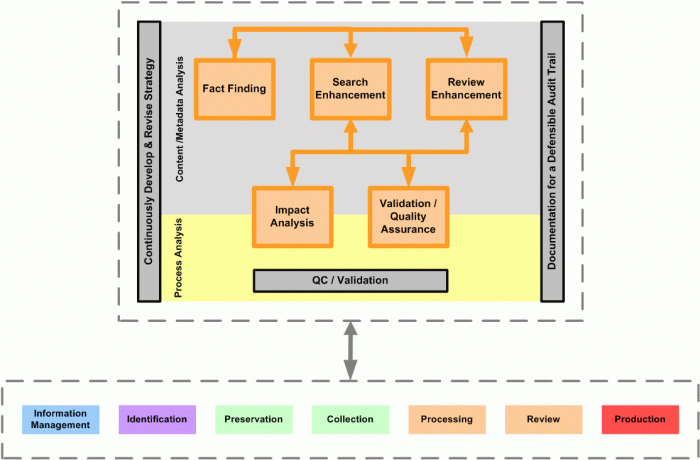
While Analysis may appear on the EDRM Framework after Review, it is really deployed in many phases of discovery as well as pre-discovery. For this reason, the second level framework “Analysis Phase Diagram”, shown above, reveals all of the phases of the EDRM Framework under the Analysis components.
As e-discovery tools and processes have matured, sophisticated analytics methods have been put to use in aid of more and more of the phases of discovery, depicted in the EDRM framework. When the model was originally conceived, the focus was on the analysis of the collected documents to make it easier to cull documents and provide increased productivity during the review step. More recently, all types of analytics (described below) are being used to increase productivity through the whole process.
The Analysis Phase Diagram attempts to show, in very broad terms, the areas in which analysis is used within the context of discovery and pre-discovery and to provide a roadmap for the following materials.\r\n
Content Analysis
The first three areas in the Analysis Phase Diagram are grouped under Content Analysis as they are concerned with understanding the circumstances, facts and potential evidence in a litigation or investigation. Analysis of Content is, in of itself, a process. Therefore, there is a certain amount of Process Analysis and Quality Assurance within the first three sections.
1. Fact Finding
1.1. Information Management
As corporations start to install better systems for information management (Records Management, Enterprise Content Management and/or Archiving) they are now looking for content analytics technologies to aid these infrastructure deployments. The question that corporations are asking in this area is:
How do we reduce the amount of information that goes into and is stored by information management and archiving systems?
Corporations are looking at rules-based extensions to their archive, compliance and investigatory systems to apply against the flow of information to:
- determine whether an item (file, document or email) is a business record and should be retained
- categorize the retained items within a corporate, departmental, project, employee hierarchy
Traditionally, Information Management system design has been a field of endeavor largely separate from electronic discovery management. Its inclusion in the original EDRM and treatment in the Analysis phase of discovery should be a reminder that no organization can afford to completely separate Information Management from the demands of discovery.
As an inducement to concentrate more heavily on Information Management concerns, EDRM created a new project team for Information Management in 2009. This discussion will attempt to touch on information management issues without restating what the new project group will undoubtedly cover in a more comprehensive manner.
Related to e-discovery and Analysis specifically, Information Management systems should be designed to accommodate legal/litigation holds, as well as identification, preservation and collection requirements. Increasingly, designers of Information Management systems need to understand not only an organization’s business uses of information and compliance issues, but litigation management and discovery issues as well.
The move to “cloud” hosted email and document solutions is not an excuse to forego thoughtful information management design. These environments engender their own set of problems that should be addressed when making the decision to move to the cloud and which service provider to choose.
Corporations are looking at the same kind of content analytics traditionally used during discovery as a filter when they catalogue information for destruction, inclusion in or exclusion from archive systems. The more information that is not a business record that can be kept out of the e-discovery flow, the more effective the e-discovery process will be.
Following the passage of Sarbanes Oxley and highly publicized document destruction incidents, corporations are crafting and implementing document retention policies. The Information Management system(s) must be designed to adhere closely to the requirements of such policies which often become the focus of scrutiny during discovery.
1.2. Litigation Readiness
One of the goals of Information Management, but not the only objective, is to set the ground work for litigation readiness. Litigation Readiness is the practice that is followed in an organization that facilitates response to litigation or investigation when it occurs.
Experienced members of the e-discovery community believe that, after a robust Information Management program, litigation readiness is the most important effort in contributing to litigation efficiencies, effectiveness, cost savings and positive outcomes.
The Analysis steps involved in Litigation Readiness often overlap with those performed during the design of an Information Management system as described above. They also mirror some of the tasks that will be performed later in the discovery process. Litigation Readiness, however, applies not to a single matter, incident, product, etc. but to any and all hypothetical matters, etc.
1.2.1. Litigation History
Facts gathered related to litigation readiness should include a review of:
- the organization’s past litigation or investigatory history;
- the litigation history and environment for the organization’s industry/industries as a whole.
This information should be analyzed to determine where the organization should prioritize the use of resources based on past litigation or industry experiences. Analysis should be able to point out what parts of the organization are most likely to engender the most discovery in the future and could therefore benefit from pre-litigation process planning.
1.2.2. Litigation/Legal Hold
Litigation hold policies and processes are easiest to implement if they are designed as part of the overall information management infrastructure. Whether or not this is possible, an analysis of the legal hold process for an organization should include the same inputs as information management with some additions:
- Inputs – Information derived from interviews with Business Clients, IT Representatives and legal department representatives.
- Identification – The Litigation Hold process should facilitate the identification of entities and persons who should participate in an actual litigation hold process. Information integral to this effort include organizational structure documentation, HR information, such as databases, data maps and hardware and software inventories.
- Preservation – As actual Litigation Holds result in preservation activities, the analysis here must focus on whether or not current systems which automatically archive or destroy data can be modified. Also, the team should review policies, procedures and software implementations that allow custodians to determine the fate of their own data such as deleting items that may be under litigation hold.
- Roles – The primary roles involved with this process would be the Litigation Hold Project Manager (often a consultant role), Senior Attorney (In-house and Outside Counsel), E-discovery/Litigation Support Professionals, Records Management Professionals and IT Representatives.
- Tools and Technology – There are many tools that have been developed that will assist with the development and tracking of the litigation hold. The Litigation Hold project team will want to review appropriate offerings, keeping in mind the experience of industry colleagues and outside counsel.
1.2.3. Outputs and Desired Outcomes
When it comes to Litigation Readiness, “The proof of the pudding is in the eating.” Litigation Readiness planning and implementation should be followed by vigorous and periodic auditing. In the same way that companies test the security of their IT systems by hiring consultants to attempt to penetrate their defenses, Litigation Readiness design teams should assume that they need some neutral, outside entity to run a drill comprised of a likely litigation scenario against the implemented readiness procedures and systems.
Organizations should also keep in mind that the information landscape changes over time. Litigation Readiness procedures become stale and need to be refreshed. The regular, periodic audit is a very good way to make sure that problems won’t arise because the corporation’s information needs, processes or infrastructure have evolved.
1.2.4. Metrics
Information as to the efficacy of a Litigation Readiness program, gleaned from an audit which includes a test litigation scenario, can be reported in the form of a Gap Analysis which asks questions such as:
- Percentage of potential custodians complying/not complying with scenario’s litigation hold
- Percentage of potential collection areas not preserved/not collectable
- Average Sizes of collected data per custodian, etc. This information will be helpful in understanding whether the litigation hold program is comprehensive and effective.
1.3. Data Assessment
Once litigation has been initiated or is likely, many tasks can be handled easily when an organization has an active Litigation Readiness program. With or without such preparation, a litigation team can benefit from a concerted effort to analyze a litigation or investigation as early as possible. The essential goal of Data Assessment is to determine the litigation team’s course of action and the consequences of each decision.
Discovery related Data Assessment Analysis is all about scope. The goal of this analysis is to make an educated prediction as to how much data should be preserved, collected and processed; how much the full discovery effort might cost; and assess the benefits and risks from various discovery scenarios. If the effort is effective the litigation team will be able to put a relative value on the litigation, prepare for the meet and confer or settlement conference, and defensibly target its collection efforts to the truly, potentially responsive custodians and data stores.
1.3.1. Inputs
- Budget Information
- Risks and potential benefits
- Project timeline and key dates (e.g. production deadlines, etc.)
- Identification / Preservation
Information integral to this effort include organizational structure documentation, HR information, and catalogues of databases, data maps and hardware and software inventories. Litigation teams should pay particular attention to the conduct and analysis of potential custodian interviews. Preparation of a questionnaire and/or checklist that will be used consistently throughout the interview process of each cusotidan will be helpful in maintaining a consistent approach to obtaining the information necessary for the identification of potentially relevant data.
Particular attention must be paid, at this stage in fact finding, to the issue of the accessibility of particular collections of ESI. The team must document not only the existence and location of subject ESI, but its format and state as related to the difficulty, hence expense, of retrieving and making it available to the discovery process. The custodian interview can be used to identify other potential custodians, people of interest, types of documents and specific content matter that may assist in the review of the content identified for collection that were not initially identified in the case assessment stage.
1.3.2. Roles
The primary roles involved with this process would be the, Project Manager, Senior Attorney, Discovery Lead Attorney, Litigation Support Manager and the IT representatives.
1.3.3. Tools and Technology
There are many tools that are used during the initial analysis and identification of documents to be collected that will track the types and locations of data within a client organization. In addition, many tools today provide content and visual analytic capabilities that can help identify gaps through sampling and review of collected or preserved data sets. For example, social networking visualizations can quickly provide an overview of other custodians of interest based on interactions with key custodians in a given matter. Important information about the case can also be obtained at an early stage from email string analysis, duplication and near-duplication analysis and concept clustering and related tools.
1.3.4. Outputs and Desired Outcomes
The desired outcome of this analysis is to make an assessment of the nature and volume of the electronically stored information (ESI) and to analyze the scope of the project and the preservation and collection efforts that may be required. A thorough analysis of ESI will allow the case team to review the information and set appropriate expectations and budgetary requirements for the remainder of the project.
Documentation that may be created could include: data maps, checklists, custodian interview questionnaires, custodian and data tracking databases, gap analysis reports detailing actual ESI availability and hardware inventories.
Additionally, the litigation team can use this stage of fact finding to begin collecting potential search terms from interviews and other interactions.
Data Strategy
Thorough analysis during Data Assessment should form the basis for most major decisions. A litigation decision tree might have the following branches:
- Litigation vs. Settlement
- Levels of Discovery Cooperation
- Responding Party strategy
- Requesting Party strategy
- Meet and Confer: 26(f) Conference Strategy
Budget
A discovery budget is dependent upon and fuels the Data Strategy decisions above. Litigators and ESI professionals should be conversant with basic cost modeling related to discovery costs so as to anticipate the ramifications of their discovery decisions.
1.3.5. Metrics
Although specific metrics are not usually created during this process, the documentation that is created and/or collected will be invaluable in the preservation and collection processes as well as to establish the defensibility of decisions and methods.
As with the litigation hold audit, a Gap Analysis can identify potentially responsive ESI that cannot be preserved or collected because, for whatever reason, it doesn’t actually exist even though it may have existed or been available at one time.
- Potential collection areas not preserved/not collectable
- Number and average size of potential custodians/collections
- Potential size of data from all documented custodians/collections
- Percentage of custodians/collections deemed to be responsive/non-responsive at this point in the process
- Any data derived from sampling of potential custodians/collections
1.3.6. Considerations
Once the phase of interviews are completed for both IT representatives and the Business Clients, the information should be compared and a complete collection protocol should be developed through the analysis of that information keeping in mind that as the actual collection process commences, there may need to be modifications to the protocol to account for additional identification of types of ESI, custodians, or storage location details that may emerge during that process.
1.4. Collection
1.4.1. Inputs
- Chain of Custody Documentation
- Inventory Documentation
- Data Maps
- Lists of Custodians
- Lists of non-custodian data locations
- Memoranda and other directives from Litigation Team
- Collected Data
1.4.2. Roles
- Internal IT
- In-house and Outside Attorneys
- Discovery and/or Forensic Consultants
- Litigation Support Manager/Project Manager
- Outside Vendors
1.4.2. Tools and Technology
There are many tools that assist in reviewing the collected data to determine whether there are any gaps within the content. A timeline view into the data set, for example, will allow the user to determine whether there are any gaps within the date ranges of the documents.
Another example would be tools that display the documents organized by timeline and/or Custodian. The user may then analyze the data to determine that all custodians expected to be collected and processed are accounted for within the data set.
Additionally, sampling may be used within the document corpus to determine whether gaps exist. A weighted sample can select documents based upon specific criteria. The sample may be weighted to a particular group of custodians, timeframe or other factor identified by the case team. There are a myriad of ways that the data set may be sampled or organized that will point to gaps within the document collection. This will allow the case team to analyze whether additional data needs to be collected or if the gaps are expected and explainable.
There are many factors to consider when determining whether there are gaps within your content. The first consideration is normally to ensure that you have data for the custodians that you have identified. The next step would be to determine that all available data types have been collected (email, hard drive, server share and portable devices or storage are the most common) for each identified custodian.
Sampling and meta-data may be used to determine gaps within date ranges, specific subject matter, and communications between parties. Review of the sampled documents will allow the case team to analyze and ensure they have the data needed to respond to their case needs.
1.4.4. Outputs and Desired Outcomes
Naturally, the outcome of a collection project is to be able to accurately collect what has been deemed to be responsive and collectable by the litigation team. With large volumes of data, it becomes necessary to analyze the items collected as part of quality control to determine whether there are any unanticipated gaps and to understand the ramifications of the actual size of the collection.
Analysis of the validity of a collection is necessary in order to defend or prosecute issues related to incompleteness or spoliation.
Analysis of the actual quantity of a collection is important to determine what impact on the size of the data population will have been made by the preservation and collection scope decisions.
1.4.5. Metrics
There are various metrics that are created and used during the analysis of collection. As previously mentioned, a Gap Report is useful in highlighting areas that should cause concern.
To enhance defensibility, collection analysis sampling should document the methods employed, such as
- Percentage of collection
- Percentage per custodian
- Date or other criteria if using weighted/tiered sampling
- Total number of message units and items
- Volume of documents in gigabytes
- Document identifiers
The results of sampling are one set of metrics that will be used in this analysis. There are also other statistics that can be generated from the document corpus that will also be used. Document counts and volumes for data by custodian, by file type, by date range and any other category that would be important to the matter should be analyzed to determine the completeness of the document collection.
1.4.6. Considerations
There may be specific reasons for content gaps that are identified in the document corpus, but in order to document and explain the gaps to the opposing parties an analysis must be performed. There may be additional collection required that is identified during the content gap analysis. This level of analysis may also identify specific collection and / or processing issues as well
2. Search Enhancement
As shown in the Analysis Phase Diagram, Analysis is a crucial component of all phases of Discovery. However, for the purposes of encouraging familiarity with the EDRM Framework, EDRM participants have chosen to leave the Analysis Phase box in its original location. Therefore, Search Enhancement can be thought of as the original “home” of Analytics in the EDRM Framework. Analysis and Search are so coupled that EDRM began a Search Project in 2009 to focus specifically on Discovery Tasks involving search. The EDRM was responding to the need to cut down on human-review by searching to locate potentially responsive and/or potentially privileged data within a collection.
The following section of the Analysis Phase is an introduction to the topic. ESI professionals are encouraged to read and/or download the EDRM Search Guide to fully understand Analysis as it pertains to Search Enhancement. Additionally, there is a very helpful EDRM white paper on the topic, Once is Not Enough: The Case for Using an Iterative Approach to Choosing and Applying Selection Criteria in Discovery, July 21, 2010 – Gene Eames, David J. Kessler and Andrea L. D’Ambra.
2.1. Inputs
The Search Enhancement team should be able to put their hands on a great deal of case information gathered earlier in discovery such as: Interview/Fact Memoranda, Draft Search Terms, Custodian Lists and Biographies, Cast of Character Lists, Case Chronologies/Timelines, Affidavits, and Responses to Interrogatories.
2.2. Roles
The success of any e-discovery process is very often defined by the skills and experience of the people involved. The following roles contribute to Search Enhancement. As corporations have increased their level of involvement in and control of the e-discovery process, many of these roles are now fulfilled with in-house and/or outside resources such as law firms and/or service providers.
2.2.1. Document Analyst/Data Analytics Consultant
Increasingly, document analysts are directly involved with e-discovery – particularly when analysis is involved during identification, preservation and collection. Document analysts define and apply criteria to eliminate unnecessary data as well as ensure that potentially relevant data is collected and/or preserved.
2.2.2. Litigation Support Manager/Project Manager
E-discovery project managers help manage project expectations and ensure that the overall project stays on-time and within established budget parameters.
2.2.3. Attorneys
A member(s) of the litigation team should help define the criteria for locating documents during search and classifying documents during review. An attorney, knowledgeable about search methodology and defensibility should work closely with the Document Analyst.
2.2.4. Review Team Representative
Review attorneys classify documents based upon established criteria. These attorneys can be in-house, at a law firm or with a specialized provider of document review services.
2.3. Tools and Technology
Any number of filtering, searching, clustering tools may be used to perform searches in defensible way. To support even the bare minimum of search analysis and defensibility, software should:
- offer reports that record hit counts for individual terms in a search;
- export reports to Microsoft Excel;
- search all items in a message unit;
- allow Boolean searches of meta data;
- offer proximity searching of full text.
2.4. Outputs and Desired Outcomes
Search Enhancement Analysis should be able to deliver a defensible reduction in data to be processed and ultimately reviewed. It should also be able to flag potentially privileged items prior to review. The metrics showing the defensibility of the outcome cannot be truly separated from the outcome, itself, in that they must be generated concurrently with the analysis to assure defensibility.
2.5. Metrics
Search is only defensible if it can be documented so that the method can be relayed to opposing counsel or the court if necessary. The following should be documented:
- Reports of Analysis of search terms, filtering, clustering, etc.
- Tagged, foldered, or exported subset of items matching search criteria
- Reports detailing all search iterations, filters, deduplication, chain of custody, sampling, validation, etc.
- List of Custodians or collections searched and total items
- Applicable Filters and total items in results
- Number of items returned by each search and by each search term
3. Review Enhancement
Project managers have realized that there can be a wide discrepancy in the capabilities of individual reviewers. From a cost and productivity standpoint, good project managers want to identify quickly those reviewers who are both highly productive and make high quality decisions. By tracking reviewer productivity, project managers have a better handle on how long it is going to take to finish the review phase of the e-discovery process.
Additionally, litigators want to speed review by providing reviewers with documents in groups to speed the decision-making process. Analysis from Search Enhancement should be portable into the review system to make grouping mechanisms such as tags available to review teams. Many litigators use search to route particular groups of documents, such as potentially privileged items, to select reviewers.
Review applications with built-in clustering, analytics, threading, inference or other tools can also be used to group documents for routing to reviewers or speeding review. Litigators should remember that any items not actually individually reviewed due to “bulk tagging” should be subject to their own quality control procedures.
The most important step in providing reviewer analytics is ensuring that the review tools track reviewer work product for each document as well as the rate of decision making per reviewer. In addition to document decision rate information, the review toolset needs to capture quality of the decisions. One way to capture quality of decisions is to have another reviewer look at the decisions by a first pass reviewer and see if any of the decisions are reversed. The ideal reviewer should have a consistently high number of document decisions per hour combined with a low or no decisions reversed quality metric.
The primary focus of analytics for the matter or project is to determine the completeness of the project and to constantly be performing logical checks on what was expected versus actual results. Some corporations and law firms now realize they can gain additional insights into their matter and perform extensive quality checks by creating automatic taxonomies of the terms in the complete matter set of documents and the terms in the responsive documents subset.
3.1. Inputs
3.1.1. Review Instructions
3.1.2. Review Memoranda
3.1.3. Review Specifications
3.1.4. Decision Log
3.1.5. Reviewer statistics
3.1.6. Quality Control measurements
3.1.7. Sampling Information
3.2. Roles
3.2.1. Review Project Manager
3.2.2. Review Team Leader
3.2.3. Review Quality Control Lead
3.2.4. Attorneys
3.3. Tools and Technology
3.3.1. Review platform with real-time custodian statistical reporting
3.4. Metrics
3.4.1. Comparison of Reviewer Speed and Quality
3.4.2. Search Enhancement Results
Review statistics should be reported so as to show the efficacy of the Search Enhancement effort. If done early in the process, while Searching is still underway, the Document Analysts can modify the search criteria if necessary.
- Percentage of reviewed documents actually responsive
- Percentage of potentially privileged documents actually privileged<
- Hit counts of search terms found in non responsive documents<
- Hit counts of search terms found in non privileged documents
- Metrics can be reported across an entire population or by custodian, file-type, reviewer, etc.
3.5. Outputs and Desired Outcomes
By using a wide range of project analytics the team can be proactive in finding problems in their e-discovery strategy or its implementation. Building on Reviewer Analytics the project manager can constantly be looking at and answering questions that impact both project cost and project risk, including:
- Have we collected and received all of the documents that we expected?
- Are we getting the average number of responsive documents per custodian that we expected
- Are reviewers making decisions at the rate that we expected and the quality that we expected
- Have we missed any custodians or collections of documents?
Process Analysis
The final two areas in the Diagram are grouped under Process Analysis as they are concerned with understanding the efficacy of the methods employed during discovery and the decisions reached based on Analysis.
4. Impact Analysis
4.1. Information Management Design
4.1.1. Impact Comparison
If possible, it is helpful to compare the impact of a new or modified information management system:
- Amount of email previously stored
- Number of documents/files previously stored
- Time to find anything
4.1.2. Litigation Readiness Gap Analysis
Analysts review litigation readiness results following an audit or an actual preservation/collection. The Gap Analysis Report should answer the following questions and provide the following detail:
- Did users/systems comply with document retention policies?
- Amount of data that should have been destroyed, wasn’t, and had to be considered for discovery
- Data that should have been retained and wasn’t
- Data that was correctly destroyed under the document retention policy that would have been retained under the old policy and would have been considered for discovery
- Percentage of users not in compliance
- Percentage of departments/groups not in compliance
4.2. Search Enhancement
Impact analysis is part of the essential search enhancement process. It should really be performed in real time to aid in its accuracy. Ideally, some preliminary human document review should be taking place during the search term creation in order to inform the process.
- Percentage of items reduced by deduplication – estimates of rate of deduplication utilizing alternative methods of deduplication such as across/within custodian and near dedupe
- Percentage of items reduced by file type/meta data filtration and impact of alternative scenarios
- Contrast in results between different search iterations
- Impact of search iterations and terms by file type, custodian, date range, etc.
- Results of validation tests and sampling across file types, meta data and search iterations
- Results of clustering
- Results of actual human review against various iterations and individual terms to show which terms were most/least effective for finding actually responsive and/or actually privileged documents
4.3. Review Enhancement
Impact analysis is part of the essential review enhancement process as it parallels the quality control process. In addition to quality control analysis, the following metrics are helpful when available.
- Comparison of human review decisions vs. any automated suggestions via clustering or analytics
- Comparison of levels of accuracy across different groups of reviewers
- Comparison of linear to clustered review in rare circumstances when both are used
5. Validation/Quality Assurance
Quality Assurance and Validation efforts must be part of any phase of discovery and also must be applied to their accompanying Analysis processes. Simply put, if decisions are made based upon Analysis then the quality of that Analysis must be assured and the methods validated. An equally important aspect is that the quality assurance and validation must be conducted in real-time to be truly beneficial.
5.1. Testing
Humans and the hardware and software they build are imperfect. It is foolhardy to base any important decision on untested data or completely rely on an untested process.
Assume the process is imperfect. It is a good practice to ask the same question different times, in different ways, of different people; especially during data mapping and custodian interviews. This idea should include testing the results returned by one software with another take the “road not taken”. This is what sampling is all about. Dip into whatever part of the data was not returned or collected and look around in a way that is different from your previous method. Assume the data holds hidden mysteries. For example:
- Review a particular month across collected data including potentially/non potentially responsive data
- Browse an entire custodian’s mail box to get a sense of their email habits or their job/department work flow
- Be creative and be willing to modify a search strategy and create additional search iterations if necessary
- Document your creativity / process ideas
- Assume that document reviewers make subjectively different review calls. Compare various issue, responsive, and privileged groups against one another.
5.2. Documentation
5.2.1. Real-Time Creation
Documentation must be created in real-time to be effective. Processes that are problematic to document may be flawed. Where a process is difficult to document, that very fact may highlight a process that needs to be redesigned earlier rather than later.
Each section outlined above has its own list of suggested documentation.
5.2.2. Timeline Creation
Create a timeline of each process. In the war against memory loss and as the ultimate aid to defensibility, the timeline has no equal. Chronologies can include:
- Event date
- Participants
- Related, supporting documentation and/or correspondence
- Outcomes such as finalization of search terms, tagging of documents for review or production
- Any decisions made about the scope, responsiveness, privilege, etc. of the case
Revision History
- November 30, 2010
- November 2, 2010